Bionic Reading
Bolds the leading letters of each word so your eyes anchor faster and skim with less effort.
Free Chrome extension
ReadEase layers Bionic Reading, Read Aloud narration, dyslexia-friendly fonts, and color filters on top of any page you visit — no account, no sign-up, one click to turn on.
Bionic Reading
Bolds leading letters so your eyes anchor faster.
Read Aloud
Reads your selection, or the page.
Features
ReadEase bundles the reading accommodations people usually need three separate tools for — built directly into your browser.
Bolds the leading letters of each word so your eyes anchor faster and skim with less effort.
Text-to-speech that reads your selection, or the whole page if nothing is selected.
Switch to a dyslexia-friendly typeface or scale text across a 12-step size range.
Loosen up dense paragraphs with adjustable line height, letter spacing, and text alignment.
Adjust brightness, contrast, grayscale, sepia, and warmth — or invert the page for glare-free reading.
Your preferences apply automatically on every site you visit — no re-configuring per page.
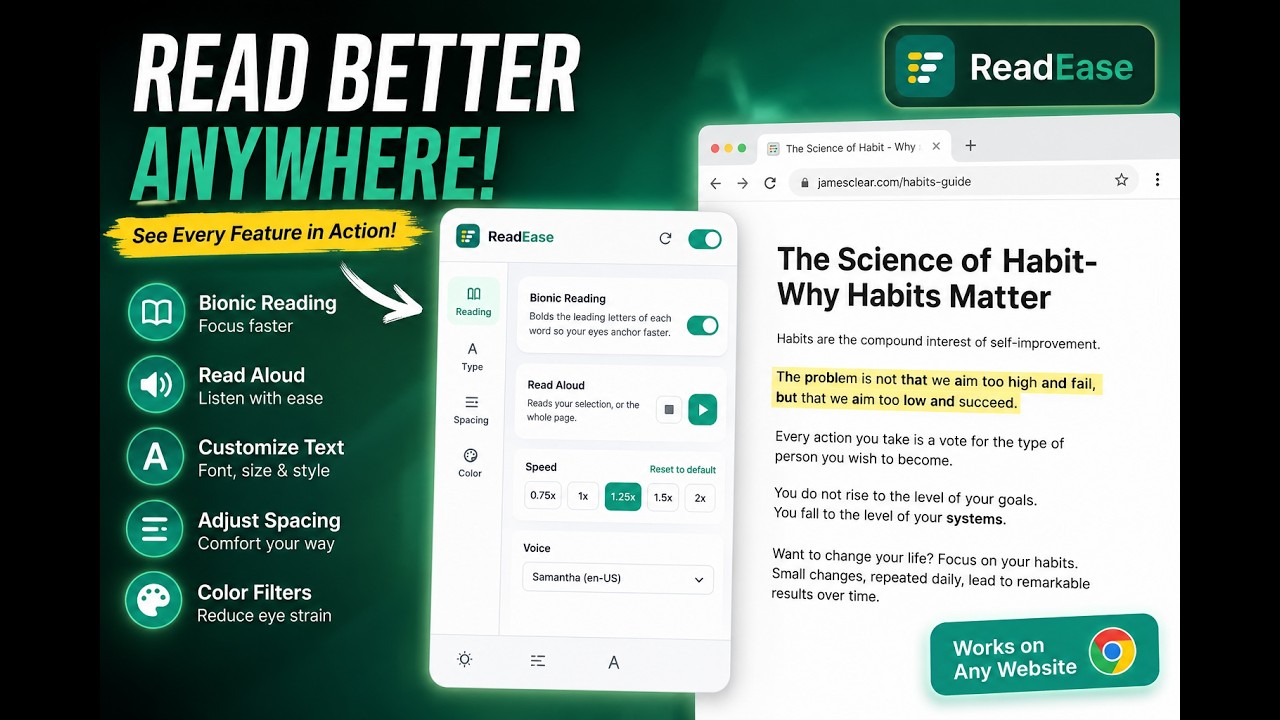
Product preview
Four panels, no page reloads. Every change applies to the page you're already on, the instant you make it.
See it in action
This walkthrough demonstrates Bionic Reading, Read Aloud, font switching, spacing, and color filters, one feature at a time.
Who it's for
ReadEase adapts to different reading needs — from learning differences to plain end-of-day eye strain.
Dyslexia & learning differences
Switch to OpenDyslexic, widen letter spacing, and enable Bionic Reading to reduce letter-swapping and reading fatigue on any website.
Low vision, migraines, light sensitivity
Boost contrast, invert glaring white pages, and scale font size up to 200% without breaking a site's layout.
ADHD & attention differences
Bionic Reading and generous line height give your eyes a clearer path through text, reducing the drift that long paragraphs invite.
Long-form reading & studying
Have dense articles and papers read aloud while you take notes, at a speed that matches how fast you can process information.
English as a second language
Slow down Read Aloud, hear correct pronunciation, and follow along visually with Bionic Reading to reinforce word recognition.
General eye strain & fatigue
Warm color filters and softened contrast make evening reading easier on tired eyes, without installing a separate dark-mode tool per site.
What readers say
"Bionic Reading plus OpenDyslexic changed how my son does his homework. He reads news articles on his own now instead of asking me to read them to him."
"I have chronic migraines and bright websites used to end my workday early. The color filter and invert mode let me keep reading without the glare."
"Read Aloud is the feature I didn't know I needed. I listen to long documentation pages while I code and it just works, on every site."
Illustrative testimonials for preview purposes.
FAQ
ReadEase is a free Chrome extension that makes any website easier to read. It adds Bionic Reading, Read Aloud text-to-speech, dyslexia-friendly fonts, adjustable spacing, and color filters on top of the page you are already viewing, without changing the underlying content.
Yes. Every feature described on this site, including Bionic Reading, Read Aloud, custom fonts, spacing controls, and color filters, is free with no sign-up or account required.
ReadEase applies its reading enhancements to standard web pages you visit in Chrome. It cannot modify Chrome's internal pages (such as chrome://extensions) or the Chrome Web Store, which browser extensions are restricted from accessing.
No. ReadEase stores your reading preferences locally using Chrome's built-in storage and does not collect browsing history, page content, or personal data for sale or advertising. See the Privacy Policy for full details.
Bionic Reading bolds the leading letters of each word, creating fixation points that guide your eyes through text. Your brain completes the rest of each word from memory, which can reduce fixation time and help some readers process text faster.
ReadEase is designed to complement, not replace, assistive technology such as screen readers. Because it uses semantic style changes, it generally coexists well with other accessibility extensions, though we recommend testing your specific combination of tools.
Read Aloud uses the text-to-speech voices already installed on your operating system and exposed to Chrome, so the exact list depends on your device. You can choose any available voice and set playback speed from 0.75x to 2x.
Install ReadEase from the Chrome Web Store, pin it to your toolbar, and click the icon on any page to open the settings panel. Toggle features on or off instantly; changes apply immediately without reloading the page.
Free forever. No account required. Install ReadEase and turn any page into an easier read in under 30 seconds.